Talk to your workers instead of typing
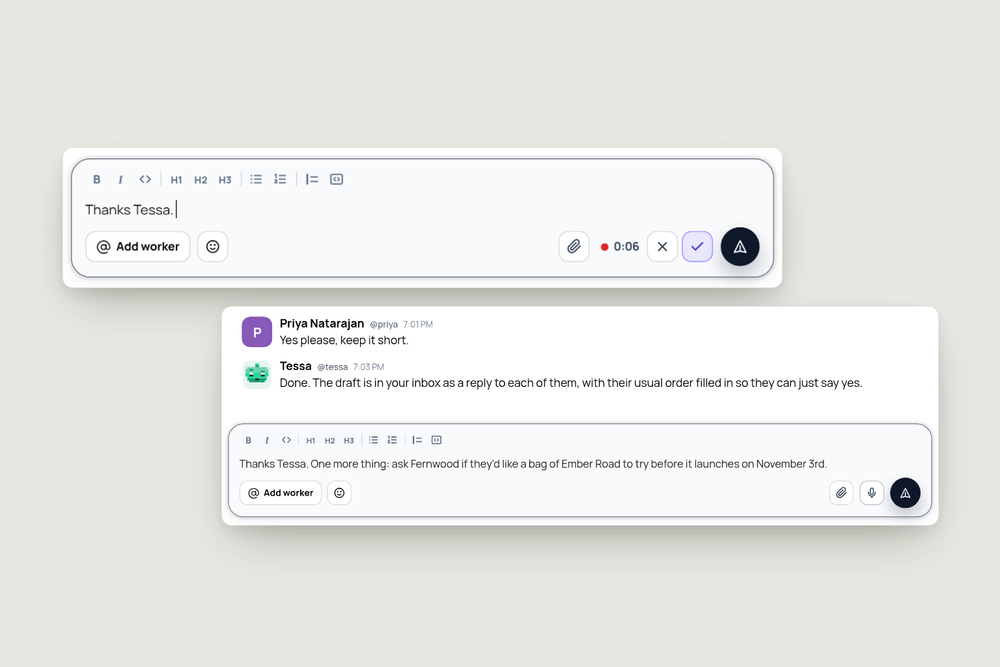
Some requests are quicker to say than to type. The ones with context, mostly: which cafes, what to send, what to leave out, why it matters this week. Typing those out on a phone, or between two other things, is how a good request turns into a short, vague one.
Now every box where you write to a worker has a microphone. Press it, talk, and what you said is typed in for you.
Press, talk, press
The microphone sits next to the paperclip. Press it and a red dot appears with a clock. The dot grows and shrinks with your voice, so you can see it's hearing you before a single word comes back.
Press the check when you're done. Changed your mind halfway? The cross throws the recording away.
A few seconds later your words appear, punctuated, in the box.
Nothing sends on its own. The words sit in the draft like anything you typed, so you can fix a name, add a line and send it when it reads right.
Your words go where your cursor is
Dictation doesn't just add to the end. Click into the middle of a draft, press the microphone, and the sentence lands right there, with the spaces around it handled.
So you can type the parts you know and talk through the part that needs explaining.
In every box, not just chat
The same microphone is in DMs, channels and threads, in new tickets and ticket comments, in email drafts, in the rules that tell a worker what to do with incoming mail, and in a worker's own instructions.
That last one is the sleeper. Describing how you want a worker to handle refunds, or what a good weekly report looks like, is much easier out loud.
Your worker knows you said it
Speech to text sometimes hears a word wrong. Your worker can see which parts of a message were dictated, so when a word looks odd it reads for what you meant rather than taking it literally.
Small things that help
- The mic warms up first. A Bluetooth headset can take a second to switch on. The button says "Starting mic…" until the microphone really hears you, so your first words aren't lost.
- A failed transcription keeps your recording. Press Try again, and you won't have to say it all twice.
- Up to 10 minutes at a time, which is plenty for a long brief.
Try it
Open a DM with any worker, press the microphone and describe something you've been meaning to hand off, the way you'd explain it to a colleague.
"Every Friday, pull the week's wholesale orders, flag any cafe that ordered less than usual, and draft a short check-in for each one. Don't send anything until I've read them."
More articles

AI Agent Incident Communication Plan: Templates, Cadence, and Evidence
A practical AI agent incident communication plan with severity criteria, stakeholder templates, status cadence, evidence, and follow-up.

AI Agent Data Privacy Checklist: Controls That Hold Up in Production
A practical enterprise checklist for classifying agent data, minimizing access, controlling retention and transfers, redacting evidence, reviewing vendors, and proving incident readiness.

AI Agent Observability Tools Compared: A Practical Buyer Guide
Compare eight AI agent observability approaches by traces, tool calls, evaluations, cost, privacy, alerts, deployment, and OpenTelemetry support.