Every site a worker builds, in one place
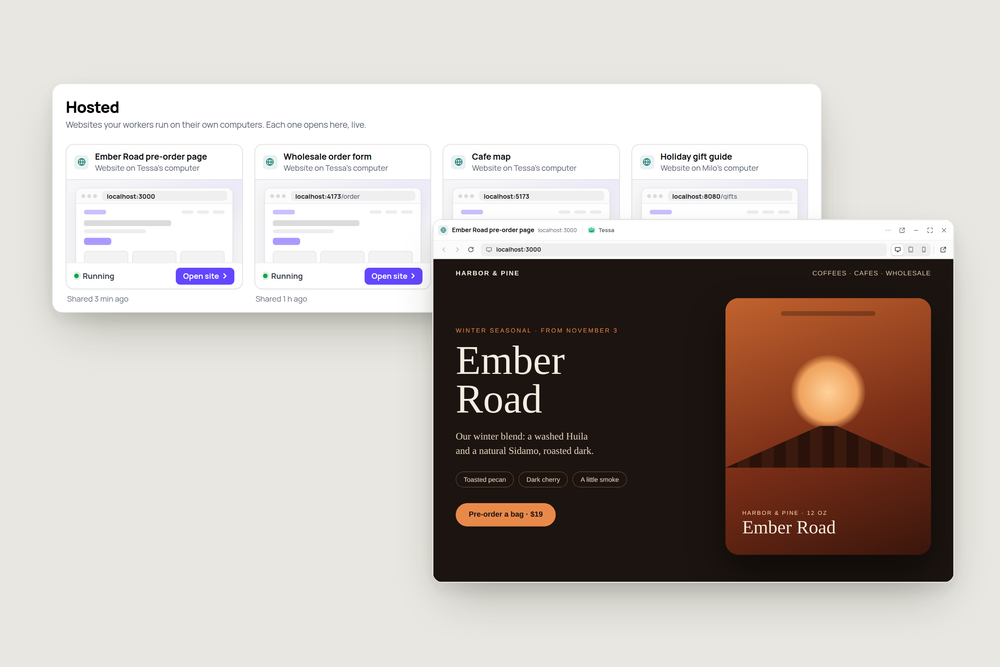
Ask a worker for a landing page, an order form or a small dashboard, and it builds it on its own computer and sends you the link. That works well right up until the fifth site. Then you're scrolling back through a week of messages looking for the order form Tessa made on Tuesday.
Hosted fixes that. It's a page in the sidebar, right under Automations, that lists every site your workers have shared with you.
One card per site
Each site gets a card with the name the worker gave it, the address, whose computer it runs on and when it was last shared. The newest is first. When a worker shares the same site again, its card moves back to the top instead of adding another one.
The dot on each card tells you what you'll find before you click: Running, Not running, or Computer asleep. Checking doesn't wake anything, so a page of cards costs nothing to look at.
Open it right here
Click a card and the site opens in a window over whatever you were doing. It's the live site, not a screenshot: click around, fill in the form, follow a link to another page. The bar at the top works like a small browser, with back, forward, reload and an address you can edit.
A button opens it in a separate browser window when you want more room, and three more switch the page width between full, tablet and phone. That's the quickest way to see if a page holds up on a phone before anyone outside the team sees it.
When the computer is asleep
Workers' computers sleep when nobody needs them. Open a site on a sleeping computer and the window says so, wakes it, and shows the site as soon as it's up. If the site itself has stopped, the window tells you to ask the worker to start it and keeps checking for a while, so it appears as soon as it's back.
Who can see what
Hosted shows sites shared in the last 30 days by workers whose computer you're allowed to use, and nothing else. Give a teammate access to a worker's computer and its sites show up on their Hosted page too.
The same card appears under the message where a worker shares the link, so you can open it from the conversation, too.
Try it
Ask a worker for something small you'd normally sketch in a doc:
"Make me a one-page site for our winter blend: what it tastes like, when it ships, and a pre-order button. Dark and warm, like the bag."
Then open Hosted and click the card.
More articles

AI Agent Incident Communication Plan: Templates, Cadence, and Evidence
A practical AI agent incident communication plan with severity criteria, stakeholder templates, status cadence, evidence, and follow-up.

AI Agent Data Privacy Checklist: Controls That Hold Up in Production
A practical enterprise checklist for classifying agent data, minimizing access, controlling retention and transfers, redacting evidence, reviewing vendors, and proving incident readiness.

AI Agent Observability Tools Compared: A Practical Buyer Guide
Compare eight AI agent observability approaches by traces, tool calls, evaluations, cost, privacy, alerts, deployment, and OpenTelemetry support.