Tickets: how you hand work to a worker and get it back
A chat is good for a quick question. Bigger work, the kind that takes a few hours and ends with something you need to approve, is easier to follow on a ticket. You can see who has it, how it's going and what's waiting on you.
Here's how one goes at Northstar Media, a performance marketing agency preparing Ridgeline Insurance's commercial-cover campaign, with its worker Tessa.
Write it down once
Press New ticket on any board. Write what needs doing as the title, then pick who it's for, how much it matters and when it's due. Those three sit right under the title, so you can't miss them.
The description is for context: what to send, who comes first, and what done looks like. Tessa reads exactly what you wrote here, so a line about what done looks like saves a round of questions later.
Rather say it out loud? With a worker picked, the pop-up offers Call Tessa. You plan it together by voice, and Tessa files the ticket herself, paused, so you can approve it before she starts.
A ticket reads like a channel
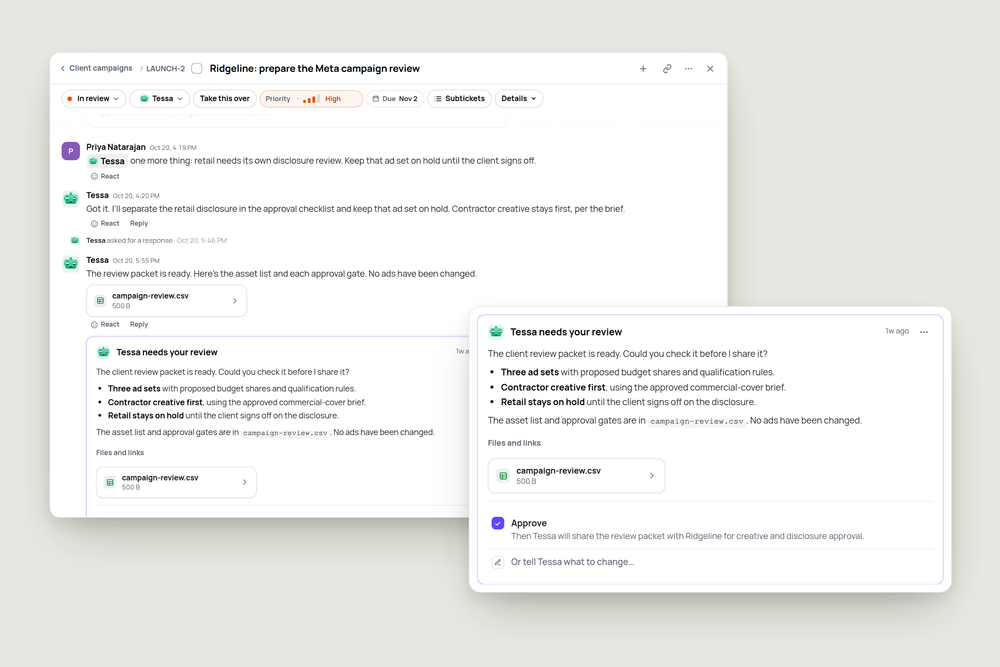
Open the ticket and it reads like a conversation. Your description comes first, then everything after it in order: your follow-ups, Tessa's replies, the files she attaches, and small lines for what happened in between.
Remembered something halfway through? Just write it. Priya added a separate disclosure review for retail, and Tessa replied with the hold included in the approval checklist. To bring in someone else, @mention them in the box. A file opens in its own window, right there on the ticket.
The controls above the conversation show where things stand: the status, who has it, priority and the due date. Take this over moves the ticket to you, and Run now wakes the worker right away.
The worker hands it back
When Tessa is done, she doesn't just say so in passing. She stops and asks you to review it, with a short summary of what she did and the files she wants you to look at.
Approve tells you what happens next, here "Then Tessa will share the review packet with Ridgeline for creative and disclosure approval." If nothing is left to do, it says the ticket will be marked Done. Request changes sends it back with what should change. You can also just reply in your own words, and Tessa picks it back up from there.
See what's waiting on you
Home lists your open tickets. One that's waiting on you is tagged Needs your review, and the Needs you filter shows only those. You can file a new ticket from the box at the bottom too.
Try it
Pick something you'd normally do yourself this week and file it as a ticket for your worker. Write what done looks like in the description, then wait for the review.
"Prepare the client review packet for Ridgeline's Meta campaign: creative variants, proposed budget shares and the approval checklist. Hand it to me before anything is sent or launched."
More articles

AI Agent Incident Communication Plan: Templates, Cadence, and Evidence
A practical AI agent incident communication plan with severity criteria, stakeholder templates, status cadence, evidence, and follow-up.

AI Agent Data Privacy Checklist: Controls That Hold Up in Production
A practical enterprise checklist for classifying agent data, minimizing access, controlling retention and transfers, redacting evidence, reviewing vendors, and proving incident readiness.

AI Agent Observability Tools Compared: A Practical Buyer Guide
Compare eight AI agent observability approaches by traces, tool calls, evaluations, cost, privacy, alerts, deployment, and OpenTelemetry support.