5 Systems You Should Automate Today
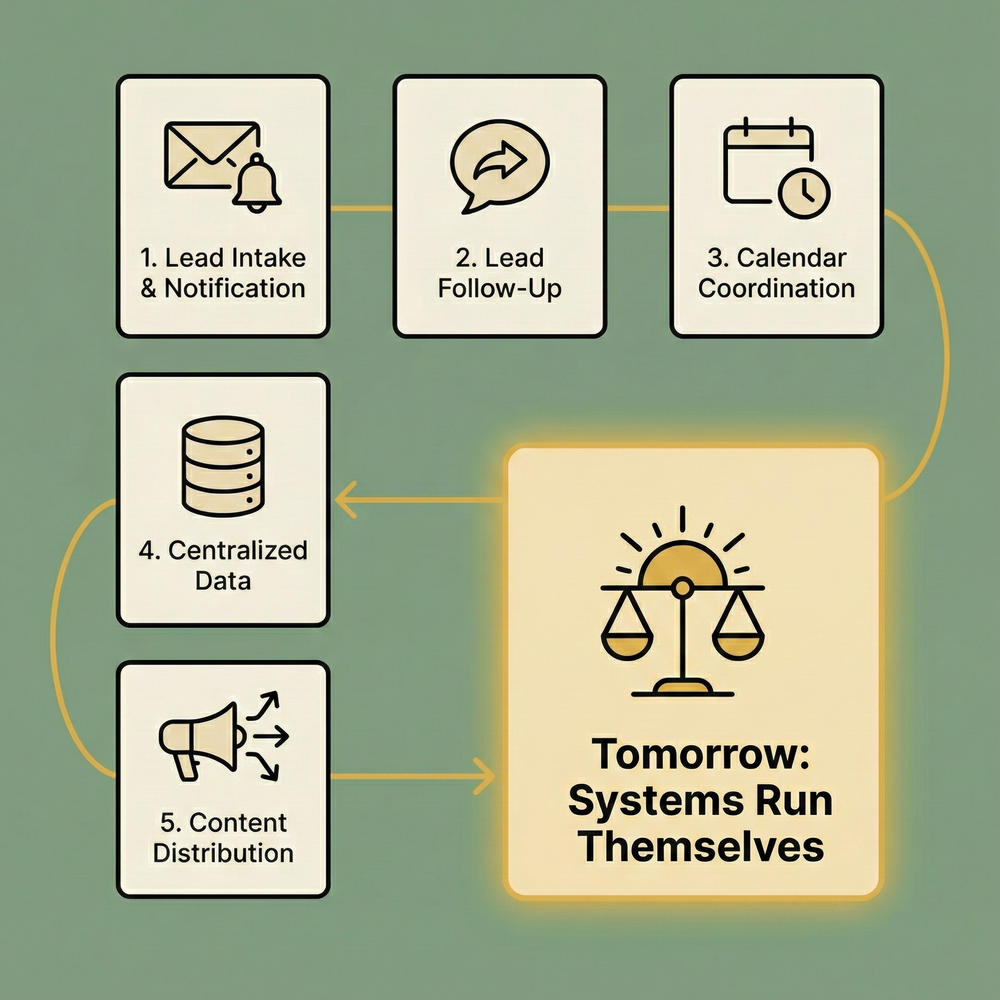
So They Run Themselves Tomorrow
People do their best work when they are not buried in operational glue.
Most teams do not struggle because they lack ideas or talent. They struggle because everyday work is fragmented across tools that do not talk to each other cleanly. Data arrives in one place. Decisions happen in another. Actions are taken somewhere else entirely. The result is coordination overhead that quietly consumes time and focus.
Automation exists to remove this friction. But in practice, building automation often introduces a new kind of work. You are asked to wire logic together, manage authentication, debug failures, and maintain workflows that break as soon as something changes.
Midpoint was built with a different assumption. Automation should feel closer to delegation than programming. You should be able to describe what you want to happen and have the system figure out how to make it real.
Below are five systems that are worth automating today. Not because they are flashy, but because they remove the kind of background work that compounds every day.
1. Lead Intake and Team Notification
If a lead comes in and nobody sees it, it might as well not exist.
Most teams collect leads through forms, ads, emails, or spreadsheets. The failure usually happens after the lead arrives. Someone forgets to check a dashboard. A notification gets buried. Follow up happens hours or days later.
This is a good system to automate because the intent is simple. When a new lead appears, the right people should know immediately.
With Midpoint, this does not require building logic step by step. You describe the behavior.
When a new lead is added to a Google Sheet, notify our sales channel in Slack and create a contact in HubSpot.
Midpoint connects Google Sheets, Slack, and HubSpot, handles authentication, and deploys the workflow. If an error occurs, you paste the error and it gets fixed. You are not deciding how to wire steps together. You are deciding what should happen.
This same pattern works if leads arrive via Gmail, HTTP webhooks, or CRM updates. The system is the same. Only the description changes.
2. Lead Follow Up and Initial Outreach
Knowing about a lead is useful. Acting on it automatically is better.
Many teams still rely on someone manually sending the first email or message. This creates inconsistency and delay. In many cases, the message itself is predictable. A confirmation. A short introduction. A next step.
This is another system that benefits from automation because it removes repetitive work without removing human judgment later in the funnel.
You might describe something like this.
When a new lead is added to HubSpot, send a personalized email from Gmail introducing our product and asking for availability.
Midpoint uses an AI model to generate the message, sends it through Gmail, and records the activity. If you want to change the tone or content, you describe the change. If a provider updates an API, Midpoint handles the adjustment.
You can also route messages through Slack, Twilio, or Telegram depending on how your team communicates. The system stays the same. Only the destination changes.
3. Calendar Coordination and Meeting Context
Calendars are critical and surprisingly fragile.
Meetings get scheduled in one system. Notes live in another. Follow ups happen somewhere else. Important context gets lost simply because it never moves where it needs to go.
This is a strong candidate for automation because it connects multiple systems that already exist.
A simple example.
Every morning, pull today’s meetings from Google Calendar, look up the attendees, summarize recent email context from Gmail, and send a briefing to Slack.
Midpoint connects Google Calendar, Gmail, and Slack. It gathers the information, generates a summary using an AI model, and delivers it where your team already works.
The same system can create Google Docs from meetings, store notes in Notion, or log activity back into a CRM. You describe what you want available and when. Midpoint builds the workflow.
4. Centralized Data Collection
Most teams still move data by copying and pasting.
Forms feed into inboxes. Inboxes feed into spreadsheets. Spreadsheets feed into databases. Each handoff introduces delay and mistakes.
Automation here is less about intelligence and more about consistency.
You might describe something like this.
When a form submission comes in, add it to a Google Sheet, store the raw data in PostgreSQL, and notify the team in Slack.
Midpoint handles the data movement and authentication. If a new field is added to the form later, the workflow can be updated with a single description instead of a rebuild.
Because Midpoint supports HTTP requests and native code execution, you are not limited to a fixed list of services. If a system exposes an API, it can be connected.
5. Content and Social Distribution
Publishing content is rarely the hard part. Distributing it consistently is.
Teams often forget to share updates across channels or delay posting because it requires manual effort. This creates uneven presence and unnecessary stress.
A simple automation can handle this.
When a new video is uploaded to YouTube, generate a short description using an AI model and post it to Slack or send it to Gmail for review.
Or.
Once per day, summarize recent GitHub activity and post a digest to Slack.
Midpoint supports YouTube, GitHub, Slack, Gmail, and AI models directly. For other platforms, HTTP requests can be used. The key point is not the number of integrations. It is the ability to describe the behavior you want and let the system handle execution.
Why These Systems Matter
Each of these automations removes a small amount of friction. Over time, that friction compounds.
You spend less time checking dashboards.
Less time copying data.
Less time remembering to follow up.
Instead of automating tasks for the sake of automation, you are building systems that quietly run in the background.
Building With Midpoint
Midpoint exists to make this kind of automation accessible without turning it into a technical project.
You are not dragging nodes onto a canvas.
You are not managing credentials manually.
You are not debugging fragile logic.
You describe the system. Midpoint builds it, tests it, and deploys it.
If something breaks, you give the error.
If something changes, you describe the update.
Most Midpoints are deployed in a handful of messages.
A Final Note
There will always be edge cases and complexity. But most automation work does not fail because it is hard. It fails because the tools make it harder than it needs to be.
Midpoint was built to reduce that gap.
If you automate the right systems today, they will quietly run themselves tomorrow.
More articles
AI Agent Incident Communication Plan: Templates, Cadence, and Evidence
A practical AI agent incident communication plan with severity criteria, stakeholder templates, status cadence, evidence, and follow-up.

AI Agent Data Privacy Checklist: Controls That Hold Up in Production
A practical enterprise checklist for classifying agent data, minimizing access, controlling retention and transfers, redacting evidence, reviewing vendors, and proving incident readiness.

AI Agent Observability Tools Compared: A Practical Buyer Guide
Compare eight AI agent observability approaches by traces, tool calls, evaluations, cost, privacy, alerts, deployment, and OpenTelemetry support.