AI Agent Access Review Checklist: Recertify Access Before It Becomes Risk
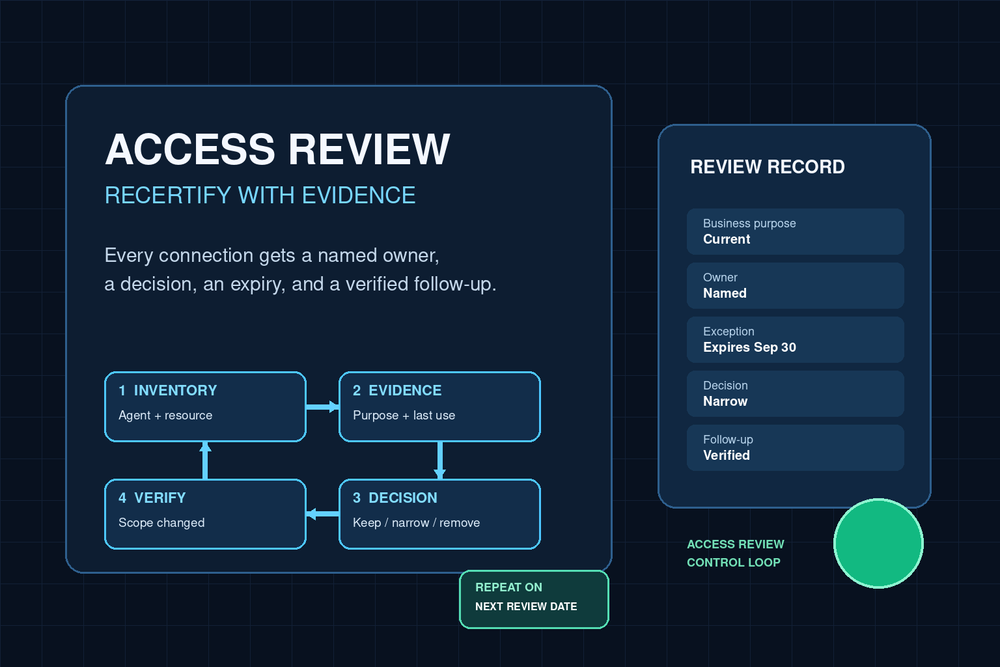
An AI agent can keep working long after the reason for its access has changed. A finance-reconciliation worker may still reach a legacy folder after the close process moved. A support helper may retain access to a former escalation queue. A temporary exception may become a standing privilege simply because nobody returns to it.
That is why an access review is not a one-time permissions design exercise. It is a recurring decision: does this agent still need this specific access, for this purpose, with this owner, and with evidence that supports the decision?
Use this checklist when: an agent already has access to connected accounts, workflow tools, files, browser surfaces, or business systems and you need to recertify that access on a repeatable cadence. It is a review worksheet, not a guide to designing roles from scratch.
For permission architecture, separate identities, and approval boundaries, start with AI agent access control and permissions. For evidence schemas and retention, use AI workflow audit trail requirements. For durable accountability, use the AI workflow ownership model. This guide owns the operating review between those disciplines: inventory, evidence, reviewer decisions, dormant access, expiring exceptions, and verified revocation follow-up.
Why recurring reviews matter for agents
Access changes meaning even when the permission record does not. The business process may change, the agent's scope may narrow, the human owner may leave, or a connected app may add a more restrictive option. A review is how a team catches that drift before it becomes an incident or an audit scramble.
NIST SP 800-53 treats access control, account management, and audit accountability as related control families. CIS Controls v8.1 calls for an inventory of accounts and for dormant accounts to be disabled or deleted after an organization-defined period where supported. Microsoft Entra Identity Governance makes the same operational point in product terms: access reviews can recur weekly, monthly, quarterly, or annually and route a decision to a reviewer.
The exact schedule is a risk decision, not a calendar ritual. Review high-impact or high-change agents more frequently. A low-volume internal summarizer may be reviewed quarterly. An agent that can export sensitive data, change customer records, initiate payments, publish externally, or act in privileged consoles deserves a shorter interval and a named escalation path.
The important distinction is this: a review does not ask whether access was reasonable when it was granted. It asks whether it is justified now.
Step 1: Freeze the review population
Begin with an inventory that can be counted and reproduced. Do not ask reviewers to browse a collection of dashboards and remember what they saw.
Create one row for every effective access path an agent can use, including:
- the agent or worker identity and the human business owner;
- the connected account, service account, API credential, browser profile, computer surface, group, role, or workflow connection;
- the resource boundary, such as mailbox, folder, CRM object, channel, project, tenant, or cloud account;
- the allowed actions, separated into read, draft, create, change, approve, execute, export, and administer;
- the grant source, grant date, next review date, and whether the privilege is standing or temporary;
- the last successful use and the last meaningful side effect, if available; and
- the evidence link that lets a reviewer validate the row.
Inventory effective access, not only the role label. A role called “Operations Agent” is not a reviewable unit if it resolves to access across five systems and two broad groups. Split it into decision-sized rows where a reviewer can say keep, narrow, remove, or escalate without guessing.
If a platform cannot export all permissions cleanly, record that limitation. The response is not to declare the review complete. Assign an owner to reconcile the missing source and keep the high-risk paths visible until the inventory is reliable.
Step 2: Set an evidence standard before sending the review
A reviewer should not have to infer why access exists. Each row needs enough context to make a defensible decision quickly.
Use a compact evidence packet:
| Evidence field | What the reviewer needs |
|---|---|
| Business purpose | The bounded outcome the agent is still authorized to pursue |
| Current owner | One person accountable for the operating need and the decision |
| Scope | The exact systems, resources, and actions granted |
| Recent use | Last use, frequency, and whether that use was expected |
| Side-effect history | Recent sends, changes, exports, or other consequential actions |
| Risk signals | Dormancy, overbroad scope, failed runs, owner change, or unresolved exception |
| Previous decision | Prior review result, conditions, and expiry date |
| Proposed decision | Keep, narrow, remove, renew temporarily, or escalate |
Evidence is not the same thing as a full audit trail. The audit-trail design tells you how events are recorded and protected. This checklist uses the smallest reliable slice of those records needed for an access decision. If the reviewer cannot see who used the access, why it exists, and whether it is still within scope, the review is not ready to decide.
Step 3: Route each row to the right reviewer
The person who implemented a connection is not automatically the right reviewer. Assign reviewers based on the access risk and business consequence.
A practical model has three roles:
- Business owner: confirms the agent still needs the access for a defined outcome.
- System or data owner: confirms the scope remains appropriate for the resource and its policy.
- Control owner: resolves ambiguous, high-risk, overdue, or exception cases and verifies follow-up.
For routine, low-risk access, one named owner may hold more than one role. For privileged, customer-impacting, financial, or sensitive-data access, require independent input. The goal is not extra ceremony. It is to prevent a broad permission from being renewed by someone who lacks authority to judge either the business need or the resource risk.
Set a real deadline and an escalation rule. A non-response is not approval. If a reviewer misses the deadline, automatically route the row to the control owner, pause the agent's access where the risk warrants it, or use a pre-agreed fallback reviewer. Record which path occurred.
Step 4: Make one of five decisions
Every row should end in a clear, time-bound disposition.
Keep
Keep access only when the purpose, owner, scope, and recent use all still support it. Record the next review date. “No issues found” is not enough on its own; the reviewer should confirm what business outcome the access still serves.
Narrow
Narrow when the agent still has a legitimate job but needs less reach. Examples include changing a write-capable connection to read-only, limiting a CRM workflow to one pipeline, replacing account-wide drive access with one folder, restricting a browser route to an allowlist, or removing an unused action from a tool grant.
A narrow decision should name the resulting scope, not merely say “reduce permissions.” Verify the new effective access afterward. A changed policy that leaves an inherited group grant intact is not a completed reduction.
Remove
Remove access when the business purpose has ended, the agent is retired, the owner cannot be established, the connection is no longer used, or the risk outweighs the benefit. Removal must include follow-up: revoke or disable the connection, stop dependent workflows safely, confirm the agent cannot still act through another path, and preserve the review evidence.
Renew temporarily
Use a temporary renewal only for a concrete, time-limited need. Include the reason, scope, named approver, expiry date, and the event that will close it. Do not let “temporary” mean “until someone notices.” CIS Controls' dormant-account guidance reinforces the value of defined periods and automatic disablement where supported.
Escalate
Escalate when the reviewer cannot establish purpose, scope, ownership, or safe follow-up. Common triggers are unknown external side effects, a shared or privileged identity, missing evidence, a regulatory hold, a disputed data owner, or a workflow whose revocation could interrupt a critical process. Escalation should identify the decision owner and a containment rule, not park the row indefinitely.
Step 5: Look deliberately for dormant and orphaned access
Dormancy is a signal, not proof. An agent may run monthly, quarterly, or only during a disaster. That is why a “last used” field must be compared with the documented operating cadence and business purpose.
Flag these cases for special review:
- no successful use beyond the organization-defined threshold;
- no consequential use where the access permits consequential actions;
- an owner who changed teams or cannot be confirmed;
- access created for a project that is closed or no longer funded;
- a temporary exception without a valid expiration date;
- broad access that is only exercised through a narrow workflow; and
- a connection that continues to exist after the agent or workflow was retired.
Do not simply delete a dormant connection without checking dependencies. First identify the workflow, scheduled job, emergency process, or human team that could still rely on it. Then choose a safe path: disable with monitoring, replace with a scoped identity, obtain an explicit owner decision, or retain it as a documented emergency exception with a short expiry.
Step 6: Treat exceptions as expiring decisions
Exception handling is where access reviews either become credible or quietly fail. Every exception needs a scope, a rationale, a named approver, an end date, and a closure test.
For example, an agent may need short-term write access to a finance queue during a migration. The exception should state the queue, permissible actions, start and end dates, migration owner, approval, monitoring, and the exact revocation or downgrade action after cutover. If the migration slips, the extension is a new decision, not an automatic rollover.
Maintain a small exception register alongside the review population. Before every review cycle, pull exceptions due to expire in the next interval. Send them to the original decision owner or a defined successor. If nobody renews them with evidence, revoke them according to policy.
Step 7: Verify revocation and close the loop
A reviewer decision is not the end of the work. The control closes only when the effective access changed as intended and any workflow impact is understood.
For every narrow or remove decision, verify:
- the grant, connection, role, group membership, browser authorization, or credential was changed or disabled;
- no inherited, duplicate, or fallback path preserves the same effective access;
- dependent workflows were paused, updated, or confirmed safe;
- the agent cannot perform the removed action in a safe test where feasible;
- the review record captures the implementer, completion time, evidence, and residual risk; and
- the next review population reflects the new state.
This is the difference between a signed spreadsheet and an operating control. A decision without verification is a request. A verified change is a control outcome.
Copyable AI agent access-review worksheet
Use these columns in each review cycle:
| Field | Review record |
|---|---|
| Review ID and cycle date | |
| Agent or workflow | |
| Business owner | |
| System or data owner | |
| Connected account or identity | |
| Resource and action scope | |
| Standing or temporary | |
| Grant source and grant date | |
| Last expected use | |
| Last observed use | |
| Business purpose still valid? | Yes / No / Escalate |
| Evidence reviewed | |
| Reviewer decision | Keep / Narrow / Remove / Temporary renewal / Escalate |
| Conditions and expiry | |
| Revocation or change owner | |
| Verification evidence | |
| Next review date |
In Midpoint, make the review visible where the work happens: attach the decision record to the workflow or ticket, name the human owner, route exceptions to a defined queue, and preserve the verification evidence with the change. Midpoint can coordinate people and workers across tickets, channels, workflows, connected tools, and computer tasks; the access review supplies the operating discipline that keeps those connections intentional over time.
Questions to ask before recertifying an agent
- What precise business outcome still requires this access?
- Who is accountable for that outcome today?
- Is the current scope narrower than the grant, and can it be reduced now?
- Does recent use match the documented cadence and purpose?
- Could the agent make an external, financial, privileged, or sensitive-data action through this path?
- What evidence supports the reviewer decision?
- Is the access temporary, and what will revoke it automatically or manually?
- If removed, what workflow or emergency process changes?
- Who verifies the effective access after the change?
- When will this exact row be reviewed again?
Practical rule: do not recertify an agent because its permission record exists. Recertify it only when a named owner can show the access still has a bounded purpose, appropriate scope, current evidence, and a next review date.
More articles

AI Agent Incident Communication Plan: Templates, Cadence, and Evidence
A practical AI agent incident communication plan with severity criteria, stakeholder templates, status cadence, evidence, and follow-up.

AI Agent Data Privacy Checklist: Controls That Hold Up in Production
A practical enterprise checklist for classifying agent data, minimizing access, controlling retention and transfers, redacting evidence, reviewing vendors, and proving incident readiness.

AI Agent Observability Tools Compared: A Practical Buyer Guide
Compare eight AI agent observability approaches by traces, tool calls, evaluations, cost, privacy, alerts, deployment, and OpenTelemetry support.