Computer Use for Complex Workflows
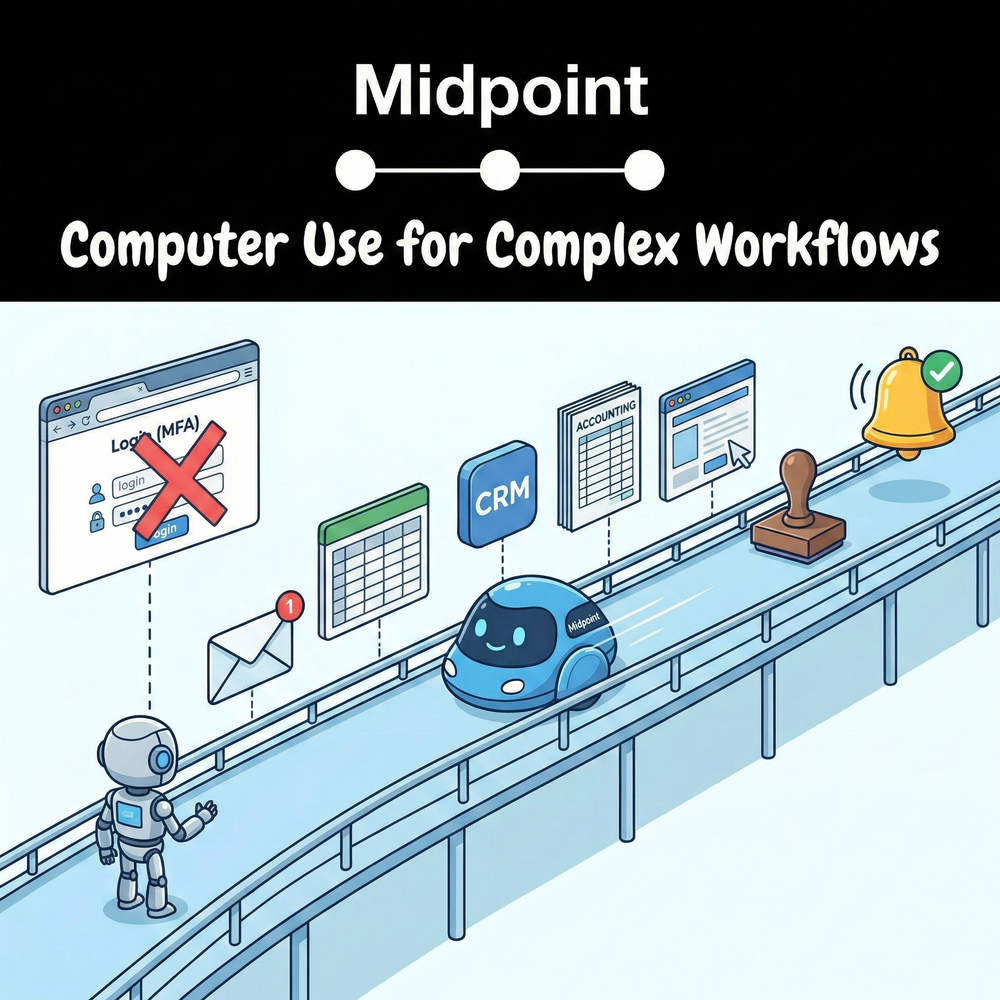
1) Stop treating “computer use” as the product
Most people see a computer-using agent click around a UI and think, “Cool, it can do anything.” Then they try it on a real workflow: multiple systems, messy inputs, approvals, audit needs, changing screens, and someone yelling “wait, not that vendor.” The demo works. Production breaks.
The punchline: computer use is a capability, not a complete operating model.
2) HubSpot’s lesson: the ROI comes from reliability, not novelty
If you look at how modern teams actually scale, the wins come from removing repeatable ops friction and making processes durable. HubSpot’s CMO Kipp Bodnar has consistently framed AI as a force multiplier for customer-facing work by freeing teams from low-leverage tasks, not as magic that replaces fundamentals.
That principle applies directly here: if the automation can’t survive edge cases and UI drift, it’s not leverage, it’s a new source of operational risk.
3) Where OpenClaw-style agents hit a ceiling
Projects like OpenClaw are helpful to understand the category: an agent that can operate a computer interface by taking actions on a screen. And platforms like OpenAI and Anthropic document “computer use” as a tool pattern where the model observes the screen and decides actions.
That approach tends to struggle when complexity rises:
- Multi-system handoffs (email → portal → spreadsheet → accounting system → CRM) where “done” spans multiple sources of truth.
- Deterministic requirements (exact field mappings, strict formatting, idempotency, re-runs).
- Approvals and controls (human review gates, permissioning, and audit trails).
- UI volatility (selectors change, pages load differently, popups, MFA, role-based views).
- Operational ownership (who monitors, who gets paged, how fixes ship).
- A pure computer-use agent is often the last mile, not the whole pipeline.
4) What Midpoint does differently for “hard mode” workflows
Midpoint’s posture is: use computer use models where they make sense, then wrap them inside a workflow system that’s designed for production operations.
Concretely, Midpoint positions itself as a managed automation layer that can run browser-based steps (including headless browser execution) and route actions through approval gates. In practice, that means:
- Hybrid execution: UI automation for portals and weird legacy UIs, plus direct integrations where APIs exist.
- Explicit workflow structure: steps, dependencies, retries, fallbacks, and “stop points.”
- Human-in-the-loop by design: approvals for high-risk actions (payments, filings, vendor changes), not as an afterthought.
- Operability: monitoring, error visibility, and fast iteration when the real world shifts.
This is how you get from “agent demo” to “workflow that survives quarter-end.”
5) The 6-step Midpoint method to win on complexity
Below is the exact approach we use to take a messy, cross-system workflow and make it robust.
Step 1: Grade
Score the workflow on volatility (UI change rate), determinism (rules clarity), blast radius (risk of mistakes), and exception rate (how often humans intervene).
Step 2: Restructure
Turn the process into clear stages (intake → normalize → decide → execute → verify) so the agent is not improvising across the whole thing.
Step 3: Separate mentions vs citations
Split “navigation” steps (what the agent clicks) from “source of truth” steps (what the system verifies). The agent can click, but the workflow must prove correctness using authoritative data.
Step 4: Open up info
Instrument the workflow so every run captures inputs, intermediate artifacts, and outputs. If someone asks “why did it do that,” you can answer in minutes.
Step 5: Tool up tracking
Add run logs, failure buckets, and alerts. You want to know: what broke, where, how often, and what changed since the last good run.
Step 6: Rethink attribution
Stop measuring “did the agent complete the task.” Measure “how much manual work did we permanently delete,” plus cycle time reduction and error-rate reduction, especially on exception-heavy processes.
More articles
AI Agent Incident Communication Plan: Templates, Cadence, and Evidence
A practical AI agent incident communication plan with severity criteria, stakeholder templates, status cadence, evidence, and follow-up.

AI Agent Data Privacy Checklist: Controls That Hold Up in Production
A practical enterprise checklist for classifying agent data, minimizing access, controlling retention and transfers, redacting evidence, reviewing vendors, and proving incident readiness.

AI Agent Observability Tools Compared: A Practical Buyer Guide
Compare eight AI agent observability approaches by traces, tool calls, evaluations, cost, privacy, alerts, deployment, and OpenTelemetry support.