Google Sheets to Gmail: a personal draft or a question for every row
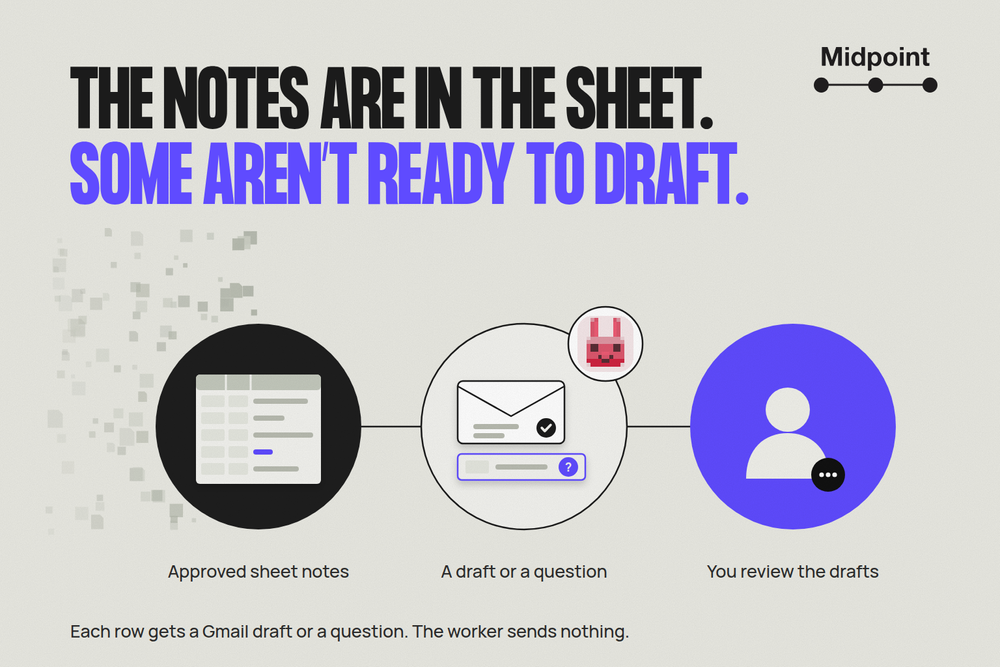
After an industry expo, the contact sheet is full and the follow-up is still unwritten. One person asked about a winter menu. Another wanted a short introduction. A third row says only “met at bar, manager name?” Sending the same paragraph to everyone would miss the point of collecting those notes.
Priya runs partnerships for a catering company. She wants to turn her Google Sheets notes into personalized Gmail emails, but she does not want a campaign sent on her behalf. She wants prepared messages she can open and review, with the incomplete contacts brought back rather than guessed.
That is the job she gives a Midpoint worker: prepare an unsent Gmail draft for each ready contact, then put its draft reference and subject beside the row. For anything it cannot prepare, return the question that needs an answer. What comes back is a sheet of drafts she can review and rows still waiting on an answer. Nothing has been sent.
Give the worker the preparation job
Priya's request is specific about the source and the stopping point:
Use the approved expo contacts sheet and its notes to prepare short personal emails in my voice. Leave them as unsent Gmail drafts. Record each draft reference and subject in the Result column. If an address or message is unclear, put your question beside the row instead. Do not send anything.
The worker does the setup as well as the writing. It confirms which sheet and which Gmail account to use, reads the approved notes, and agrees with Priya where to write results so her original notes stay as they are. Priya supplies an approved tone reference and identifies any rows that should not be contacted.
A note is evidence for the message, not permission to invent the rest of a conversation. The worker keeps each draft tied to the row that explains why it exists.
One draft ready, one row held
The hotel contact's note says: “wants winter menu, ask re: gluten-free options.” The recipient address is complete. The worker prepares a draft with the subject “Winter menu and gluten-free options”:
Hello,
Following up on your interest in our winter menu: which gluten-free options would be most useful for your guests? I can put together the relevant menu details for you to review.
Thanks,
Priya
It does not claim a menu is attached, quote a price or promise a tasting date. The message uses the approved note and leaves the next decision with the recipient.
Beside that contact, the result says “Draft ready,” followed by the subject and the draft reference. It also tells Priya which Gmail account the draft is in, so she can open Drafts there and find the matching subject. When the worker returns a direct link, it first checks that the link opens that draft. It never builds a link from an ID.
The bar contact has no usable email address and an uncertain name. That row gets no draft. Its result is a question: “Which address should this go to, and what did you agree to follow up about?” An empty cell would hide the unfinished work. A precise question tells Priya how to unblock it.
When a mail merge is enough
A clean sheet and an approved template may not need this kind of delegation. Gmail mail merge can use any spreadsheet column as a merge tag on eligible plans, not just names. Google's Apps Script mail-merge solution writes sent dates or errors to rows and skips completed ones.
Document Studio offers conditions, previews and scheduled runs. Zapier also supports creating Gmail drafts from Google Sheets rows. Personalization, draft creation and row status are not exclusive to a worker.
Midpoint is useful when you want to hand over the preparation itself: reading uneven notes, writing a different message for each contact, keeping the Result column current and bringing back the gaps. The difference is who owns that work, not whether a merge tool can insert a custom field.
Check existing drafts before preparing more
When Priya returns with more contacts, she asks the worker to prepare only the new, approved rows. It checks existing draft references before creating another copy. If a reference is missing or no longer opens, it tells Priya instead of taking a “done” mark as proof or quietly making a replacement. Held rows wait for an answer.
For the reverse job, where incoming email needs to become a current request list, use the Gmail-to-Google-Sheets request register. If approved messages include campaign links, a separate campaign link check can catch destination and tracking mistakes before anyone sends them.
The rules stay simple: use the approved notes, never guess a recipient or a promise, and leave sending to Priya. A draft doesn't mean an email was sent, delivered, read or answered.
Start with the sheet you already have
Your Midpoint worker comes with its own computer and browser. Connect the Google apps it needs or save the required website logins; the worker then sets up the job and checks what it hands back. Connecting an account gives it access; it doesn't set the job up by itself.
Use this contact sheet to prepare personal Gmail drafts from the approved notes. Return a draft reference and subject for every ready row, or the question preventing preparation. Leave all messages unsent and bring the results back for my review.
More articles

AI Agent Incident Communication Plan: Templates, Cadence, and Evidence
A practical AI agent incident communication plan with severity criteria, stakeholder templates, status cadence, evidence, and follow-up.

AI Agent Data Privacy Checklist: Controls That Hold Up in Production
A practical enterprise checklist for classifying agent data, minimizing access, controlling retention and transfers, redacting evidence, reviewing vendors, and proving incident readiness.

AI Agent Observability Tools Compared: A Practical Buyer Guide
Compare eight AI agent observability approaches by traces, tool calls, evaluations, cost, privacy, alerts, deployment, and OpenTelemetry support.