Browser Automation Test Plan: A Practical Template for Release Confidence
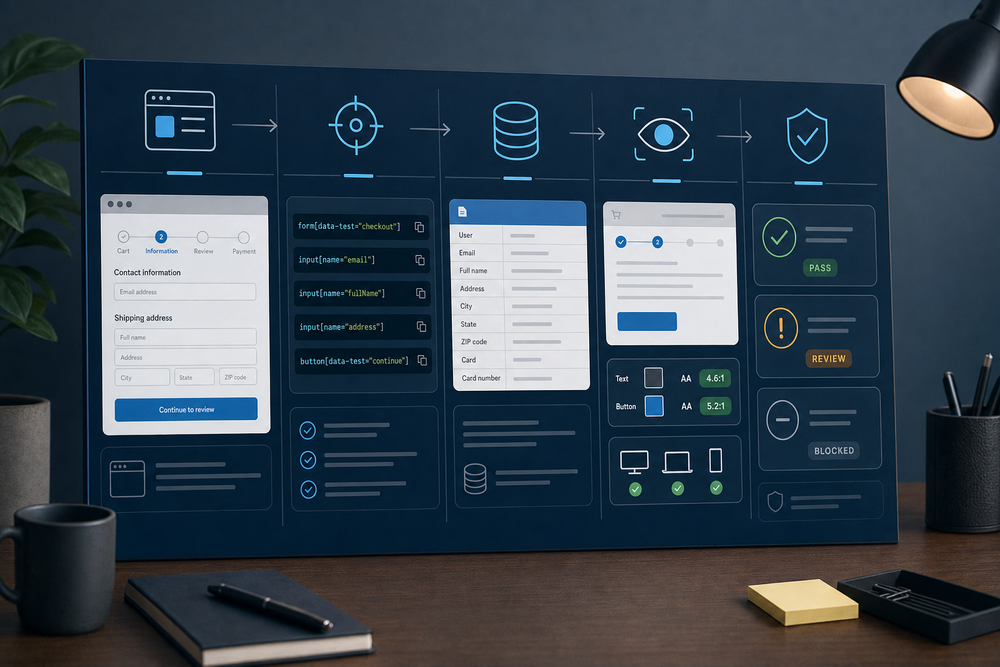
A browser workflow can succeed in a demo and still fail in the places that matter: the wrong record is selected, an approval is skipped, a form quietly accepts bad data, a visual change hides the next action, or a release breaks the only path users need. A useful browser automation test plan turns those risks into named checks with known data, observable outcomes, and a release decision.
This template is for teams validating browser-based workflows that reach a real application interface. It deliberately focuses on UI state, selector contracts, test data, visual checks, and release gates. It is not a framework-selection guide, an agent evaluation rubric, a security review, or a monitoring runbook.
What a browser automation test plan must prove
The plan should answer one practical question: can this workflow complete the user-facing job, in the supported browsers and states, without a regression that should block release?
That is narrower than proving every service is healthy. API and integration tests should catch data-contract failures earlier and faster. The browser suite owns the parts only the interface can prove: the right controls are discoverable, the page reaches the expected state, keyboard users can operate it, the visible result is intelligible, and a deployment has not changed the workflow contract.
Start with a small, named scope. Write the business outcome in one sentence, then define the browser path that demonstrates it. For example: “An accounts-payable coordinator can upload a supplier invoice, review extracted fields, route it for approval, and see a recorded result.” The path is not “click every button.” It is the minimum reliable journey that would make a broken release expensive.
A good first release set normally includes:
- one happy path for each critical outcome
- one validation or permission boundary that must refuse unsafe input
- one recovery path for a realistic interruption
- one representative viewport and browser matrix
- one accessibility interaction pass for keyboard focus and labels
Keep every test tied to a release risk. If a test has no user-facing risk, a lower-level test may be the better home for it.
Copyable browser automation test plan template
Use this as the working record for each workflow. Store it with the release evidence, not only in a test runner.
| Field | What to record | Example |
|---|---|---|
| Workflow and owner | User-facing outcome, product owner, QA owner | Invoice intake to approval, Finance Ops, QA |
| Release risk | What becomes wrong if this fails | Invoice reaches the wrong cost center |
| Preconditions | Environment, feature flags, browser, starting state | Staging, Chrome current, test tenant reset |
| Test data | Stable fixture IDs and permitted variants | Supplier A, invoice 1042, approved cost center |
| Selector contract | Role, label, or test ID for each important control | getByRole('button', { name: 'Submit for approval' }) |
| Steps | Short observable actions | Upload, inspect fields, choose cost center, submit |
| Expected UI state | What the user can see and what the page exposes | Approval status appears, activity row is present |
| Visual checks | Viewport, screenshot target, tolerances | 1440px and 390px, summary panel and confirmation |
| Evidence | Trace, screenshot, record ID, release run | Linked run artifact and timestamp |
| Release rule | Pass, quarantine, or block criteria | Any critical path failure blocks release |
The template is intentionally explicit about selectors and data. Those two fields turn an attractive checklist into a test another person can maintain.
Build UI automation test cases around state, not clicks
A click sequence is fragile because it describes mechanics, not the contract. Write each case as a transition between visible states.
For a supplier-invoice flow, the useful states might be: upload ready, file accepted, fields ready for review, approval queued, approval recorded, and an actionable error state. Each step should assert the outcome that makes the next step safe. Do not click “Continue” and assume the page moved. Assert that the next panel is visible, the previous panel is no longer active when appropriate, and the expected data is present.
Playwright’s guidance supports this pattern: use locators, keep tests isolated, and use web-first assertions rather than fixed waiting. Prefer user-facing locators such as roles, labels, and visible text. Use an explicit test ID when a control has no durable user-facing identity or when product copy is expected to change. Avoid brittle CSS paths, positional selectors, and selectors that duplicate implementation details.
For every UI automation test case, record:
- Starting state. The account, role, feature flag, browser, and fixture must be known.
- Action. One meaningful user action, not a bundle of unrelated clicks.
- State assertion. An observable condition that says the application accepted, rejected, or transformed the state.
- Data assertion. The record, value, or row that proves the workflow used the right data.
- Recovery assertion. Where appropriate, prove the user can correct the failure or safely retry.
This separates a real workflow test from a smoke test that only confirms a page loaded.
Treat selectors as a shared contract
Browser tests become noisy when selectors are an afterthought. A selector is a contract between the product UI and the automation suite. It should change only when the user-facing behavior or an intentionally stable test hook changes.
Use this order of preference:
- Accessible role plus an accessible name, such as a button, heading, or dialog.
- Associated label, placeholder, or meaningful text for an input or content region.
- A dedicated
data-testidfor a durable testing hook. - A scoped locator inside a stable component boundary.
A selector review belongs in the pull request when a workflow changes. Ask: does this locator identify one meaningful control, is it readable by a reviewer, and will it survive a visual refactor that preserves the behavior? If the answer is no, repair the contract before the suite becomes a pager generator.
Make test data safe, repeatable, and diagnosable
Do not let browser regression tests improvise with production-like data. Each test needs fixtures that are permitted, resettable, named, and isolated enough to make failures explainable.
Separate test data into three categories: reference data that should not change during a run, scenario data created for one test, and cleanup data that can be deleted or expired. Give each a stable identifier. When a failure occurs, a reviewer should be able to locate the exact record without guessing which one of fifty “Test Company” entries the run used.
Use realistic variants where presentation affects the workflow: long vendor names, missing optional fields, different approval thresholds, duplicate file names, and boundary dates. Avoid using sensitive data merely because it looks realistic. The browser plan should describe the allowed fixture source and the reset method.
Add visual and accessibility checks where the UI carries meaning
Functional assertions can pass while a release makes the workflow unusable. Include visual checks for the moments that carry user decisions: a review screen, validation message, approval state, summary, and completion evidence. Capture a deliberate desktop viewport and a literal narrow-phone viewport. If a table or dense summary exists, confirm that the page remains bounded and that only the intended region scrolls.
Visual comparison should have a reasoned scope. Snapshot the meaningful component or region, not every timestamp or random avatar on the page. Record known dynamic areas and use deterministic test data so a visual diff indicates product change rather than test noise.
Accessibility is also part of browser behavior. For the critical path, verify keyboard reachability, visible focus, a logical focus order after dialogs and validation errors, correctly labelled controls, and an escape route from custom components. W3C’s WCAG 2.2 guidance on keyboard focus and focus appearance makes this a concrete release concern, not a cosmetic afterthought.
Define regression release gates before the run starts
A release gate is a decision rule, not a report written after a failure. Define it before the suite runs.
A practical rule set is:
- Block: A critical workflow cannot complete, a required authorization or validation boundary fails, an expected record is missing or wrong, a keyboard user cannot complete the path, or a meaningful visual defect obscures an action.
- Quarantine and investigate: A test has a reproducible environment or third-party dependency failure that does not establish a product regression. The release owner records the risk and decision rather than silently rerunning until green.
- Pass with follow-up: A non-critical visual or copy defect has a documented owner and date, while all release-critical outcomes and accessibility checks pass.
Do not convert a failing assertion into a retry without understanding it. A retry can be useful for an explicitly transient dependency. It is not evidence that the workflow is reliable.
Run the plan as a release routine
Before release, reset fixtures, pin the supported browser matrix, record the version under test, and run the critical workflow set. Attach traces, screenshots, and links to created test records. Review failures by impact, not only by count.
After release, rerun the same critical set against the deployed environment. Compare the visual evidence at the intended desktop and phone widths. Confirm the release state in the application, not only a green CI status. If a change touches a selector contract, test fixture, or visual baseline, record why. That history is what lets the next team distinguish deliberate product evolution from a regression.
For the broader operating decision, pair this plan with a browser automation vs API integration guide, an AI agent testing framework, the browser automation monitoring checklist, and the enterprise workflow overview. Those guides handle interface choice, broader evaluation, post-release monitoring, and deployment context. This plan owns the browser release boundary.
More articles

AI Agent Incident Communication Plan: Templates, Cadence, and Evidence
A practical AI agent incident communication plan with severity criteria, stakeholder templates, status cadence, evidence, and follow-up.

AI Agent Data Privacy Checklist: Controls That Hold Up in Production
A practical enterprise checklist for classifying agent data, minimizing access, controlling retention and transfers, redacting evidence, reviewing vendors, and proving incident readiness.

AI Agent Observability Tools Compared: A Practical Buyer Guide
Compare eight AI agent observability approaches by traces, tool calls, evaluations, cost, privacy, alerts, deployment, and OpenTelemetry support.