Interview panel coordination across time zones
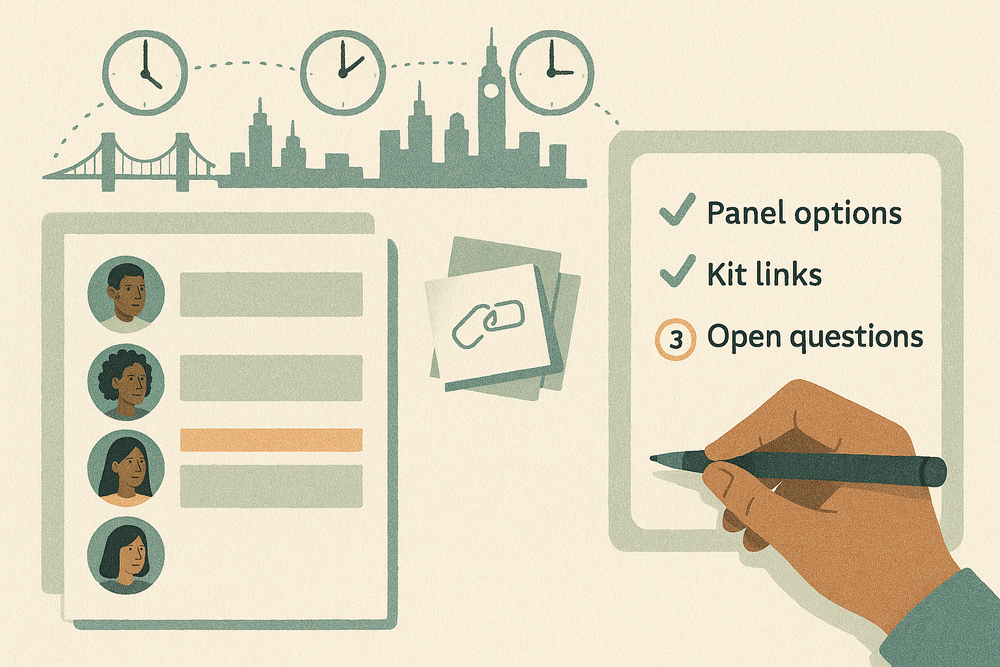
The candidate can do Tuesday afternoon. The engineering interviewer is in San Francisco, the collaboration interviewer is in New York, and the hiring manager is in London. Two calendars look open. The third person has not confirmed whether they can stay late. Somewhere in the thread is a link to the wrong interview kit.
The recruiter has to check who can take each part of the interview and whether everyone has the right material. Those details need settling before the candidate is offered a time.
A Midpoint worker can prepare that answer. Give it the panel requirements, the candidate’s stated availability, and access to the calendars and recruiting documents it needs. It comes back with a few checked options, the kit links, and a plain list of what’s still unknown. The recruiter picks one and sends the invitations.
Use your ATS scheduler when it already does the job
Start with the scheduling tools you already pay for. Greenhouse’s automated scheduling can suggest times using candidate availability, interviewer availability and working hours. Its documentation specifies Job Admin or higher permissions, a connected calendar and the Core, Plus or Pro subscription tiers. Calendar visibility still matters: the scheduler needs permission to see interviewer calendars to avoid their busy events.
Greenhouse’s scheduling overview covers interviewer groups, workload limits, training and buffers. Its scheduling feature page also describes replacing declined interviewers from the same group. Check which features and settings apply to your account before building a second coordination layer.
If your ATS already brings the interview plan, eligible panelists, availability and confirmations together, use it. A worker is more useful when the coordinator must also reconcile a request in a team conversation, a role-specific document, calendar access gaps and a recruiter’s exception rules. Keep the ATS as the recruiting record rather than creating another version of the candidate’s history.
Write a panel brief
Imagine a coordinator preparing a senior backend engineer’s next interview stage. The candidate is in New York and has offered October 13 or 15, from noon to 2 p.m. local time. The team wants a technical conversation, a collaboration interview and a short hiring-manager close, with breaks between sessions.
A useful request might read:
Prepare two panel options for the backend engineer interview stage on October 13 or 15. The candidate’s window is 12:00–14:00 America/New_York. Use Maya for the 45-minute technical interview, Leo for the 30-minute collaboration interview and Amira for the 20-minute hiring-manager close. Include two 10-minute candidate breaks. Keep the London close within Amira’s confirmed interview hours. Priya is the approved alternate for Leo’s segment; do not substitute anyone else. Use the current role and stage kits. Return the options and unresolved questions in this recruiting ticket. Do not contact the candidate, create holds or send invitations.
That brief gives the worker something more useful than “find a time.” It specifies the order, duration, permitted replacement and invitation boundary.
Add the ATS application link, the approved interview plan and the coordinator who owns the final decision. If the candidate wrote “Tuesday afternoon” without a location, ask for their time zone before preparing bookable options. Do not infer it from their résumé, phone number or the company’s office.
For working rules, distinguish a preference from a limit. “Avoid Friday if possible” can be traded against other options. “No interview after 19:00 Europe/London” cannot. An interviewer’s workload limit and qualification for a segment also belong in the brief. An empty calendar doesn’t make someone a valid replacement.
Give the worker the access it needs
In Midpoint, assign a worker to the recruiting coordination work and give it a private place to return the result, such as a recruiting ticket or a restricted team conversation. Connect the calendar account it should use and share only the recruiting documents it needs.
Midpoint’s Google Calendar tools include availability checks and event reads. Those checks depend on the calendars that the connected account can actually access. A calendar connection does not give the worker visibility into every interviewer’s schedule.
For the ATS, use whichever access your team has approved: an available connection with the required permissions, or the worker’s computer and an authorized browser account. Confirm that the worker can read the intended candidate record, interview stage and kit before assigning a queue of candidates. Do not treat a connected calendar as proof that the ATS is connected too.
For this first assignment, the worker only reads records and prepares options. Use accounts with read-only access where your tools offer it, and leave calendar changes and external messages with the recruiter. The recruiter can keep the final booking entirely in the ATS. If you later allow the worker to carry out a booking after approval, make that a separate, explicit step covering the exact candidate, panel, date, time and recipients. Read the human-in-the-loop approval guide for structuring that boundary.
A candidate’s scheduling packet does not need their compensation history, references or every interview note. Prefer links to restricted records over copying sensitive details into the summary. The data privacy checklist is a useful starting point for deciding what the worker should read, retain and share.
Check each interviewer’s segment
In the example, the first option could run on Tuesday, October 13, from 12:00 to 13:55 in New York. That is 09:00–10:55 in San Francisco and 17:00–18:55 in London on that date.
The worker checks the candidate against their whole window, and each interviewer against only their own segment. Maya needs the 45-minute technical slot. Amira needs the closing slot plus any required buffer. A shared room or video resource, if required, needs its own check too.
The plan also needs to preserve the role’s interview coverage. Priya can stand in for Leo only because the coordinator named her as an approved alternate for the collaboration segment. An alternate still needs to be qualified for the segment.
Ask Amira to confirm her late slot even if her calendar is empty. Note when calendars were checked and who still needs to agree. Before the recruiter sends the invitations, recheck the selected option so a new meeting does not turn an earlier suggestion into a conflict.
Write the full date and time zone beside each option. London and New York are five hours apart on October 13 and 15, but that gap changes around daylight-saving transitions. Check both the start and finish against each interviewer’s hours.
Send the recruiter a clear summary
For that request, the worker’s summary might look like this:
Backend engineer panel: two options for your decision
Choose Option A or B. Three checks are still open:
- Amira’s hours, both options: her close is 18:35–18:55 London. Her calendar is free, but she hasn’t confirmed she’ll interview that late.
- Priya’s availability, Option B: Leo is busy, so this option uses your approved alternate. Priya’s calendar isn’t visible; she needs to confirm her segment.
- Interviewer kit access: Maya needs to confirm that the technical kit opens for her. If you choose B, Priya also needs access to the collaboration kit.
Option A: Tuesday, October 13, 2026, 12:00–13:55 New York
San Francisco 09:00–10:55. London 17:00–18:55. The candidate offered 12:00–14:00 America/New_York.
- 12:00–12:45 New York: technical interview, Maya. Free.
- 12:45–12:55: candidate break.
- 12:55–13:25: collaboration interview, Leo. Free.
- 13:25–13:35: candidate break.
- 13:35–13:55: hiring-manager close, Amira (18:35–18:55 London). Free, needs her OK.
Option B: Thursday, October 15, 2026, same times and breaks
- Technical, Maya. Free.
- Collaboration, Priya instead of Leo (Leo is busy). Calendar not visible, needs her OK.
- Close, Amira. Free, needs her OK.
Interview kits: backend technical kit, collaboration kit, hiring-manager kit and the ATS application record. All three kits match the backend engineer onsite stage. Maya’s access is unverified; Priya doesn’t yet have access to the collaboration kit.
Calendars checked Thursday, October 8, 2026, at 10:20 America/New_York. I’ll recheck the option you pick before you send invitations. Nothing is booked, no holds are placed and the candidate hasn’t been contacted.
Keep either option conditional until its open checks are resolved.
The interview kit is part of that decision. Check that each link leads to the intended role and stage, and that its sharing is appropriate for the named interviewer. When the worker cannot verify an interviewer’s access, say who needs to confirm it. The kit opening for the worker doesn’t mean it opens for Maya or Priya.
The candidate-facing agenda and internal interviewer materials should remain separate. The recruiter may want to share the sequence and breaks with the candidate without exposing internal questions, scorecards or previous feedback.
When a panelist declines
Check availability again when the recruiter selects an option. If there is now a conflict, return the changed segment and the best permitted alternative instead of moving the entire interview without notice.
When an interviewer declines after booking, the response depends on the team’s rules. The ATS may already handle replacements. Where a coordinator must approve the change, the worker can check the named alternate, update the proposed kit assignment and return the difference for review. It should not decide that the missing interview is unnecessary or silently replace a specialist with someone outside the approved group.
If the worker can’t see a calendar, mark that slot as unknown. The worker can still assemble the known portions of the plan and identify the exact calendar or confirmation needed. If no complete option survives the constraints, say so. For example: “Neither date has a complete panel. Can the candidate offer another window, or can you approve a different collaboration interviewer?”
Avoid creating tentative holds while the worker is only preparing options. Holds are calendar changes, can expose candidate information and can block colleagues’ time even when no invitation email is sent.
Follow up on missing feedback
After the interviews, the job isn’t finished until the expected feedback is in, or someone owns what’s missing.
Use the ATS’s existing reminders when they are sufficient. Greenhouse’s scorecard reminder settings, for example, already include an automatic reminder after the interview and follow-ups until submission or the configured stopping point. Check those settings before adding another chase. For an exception follow-up, the worker can check which scorecards are still missing for this panel and prepare a reminder for the coordinator to review. Give it only the status information it needs. State the interview, owner and due time; do not copy evaluative notes into a broad channel.
A submitted scorecard, a saved draft and a record the worker cannot access are three different states. The summary should preserve that distinction. Three records can still mean only two submitted scorecards.
A follow-up note could read: “Backend engineer panel, October 13: two scorecards submitted, one saved as draft (Leo, due Wednesday, October 14, 17:00 America/New_York). Suggested reminder to Leo attached for you to send.”
The worker does not score the candidate, rank applicants, infer suitability or submit feedback on an interviewer’s behalf. Those decisions belong to the hiring team. Nor should it choose recipients or repeatedly chase people beyond the coordinator’s approved reminder policy.
Try it on one interview stage
Try one interview stage with a clear owner and a controlled panel brief. Judge the result by what the coordinator must repair: incorrect time zones, missing interview coverage, broken kit access, unauthorized substitutions and reminders that duplicate the ATS.
Then look at the practical outcome: time from a complete request to a recruiter-ready option, rework before booking, and missing feedback at the team’s deadline.
If your ATS already brings the plan, the panelists, the availability and the confirmations together, use it and stop there. If the remaining work lives across conversations, calendars and restricted documents, a Midpoint worker can hand you checked panel options while you keep control of the candidate experience.
Talk with Midpoint about a recruiting coordination workflow that fits your ATS, your access rules and your approval process.
How you'd run this on Midpoint
Your worker already has its own computer and browser. You don't have to set up either one.
Connect the accounts this job needs, or save a website login for the worker to use. Share the relevant files and tell it what you want in plain words:
Find two interview options for this candidate and panel. Include the right kit links and anything unconfirmed. Leave invitations to me.
More articles

AI Agent Incident Communication Plan: Templates, Cadence, and Evidence
A practical AI agent incident communication plan with severity criteria, stakeholder templates, status cadence, evidence, and follow-up.

AI Agent Data Privacy Checklist: Controls That Hold Up in Production
A practical enterprise checklist for classifying agent data, minimizing access, controlling retention and transfers, redacting evidence, reviewing vendors, and proving incident readiness.

AI Agent Observability Tools Compared: A Practical Buyer Guide
Compare eight AI agent observability approaches by traces, tool calls, evaluations, cost, privacy, alerts, deployment, and OpenTelemetry support.