Competitor price monitoring for a weekly pricing review
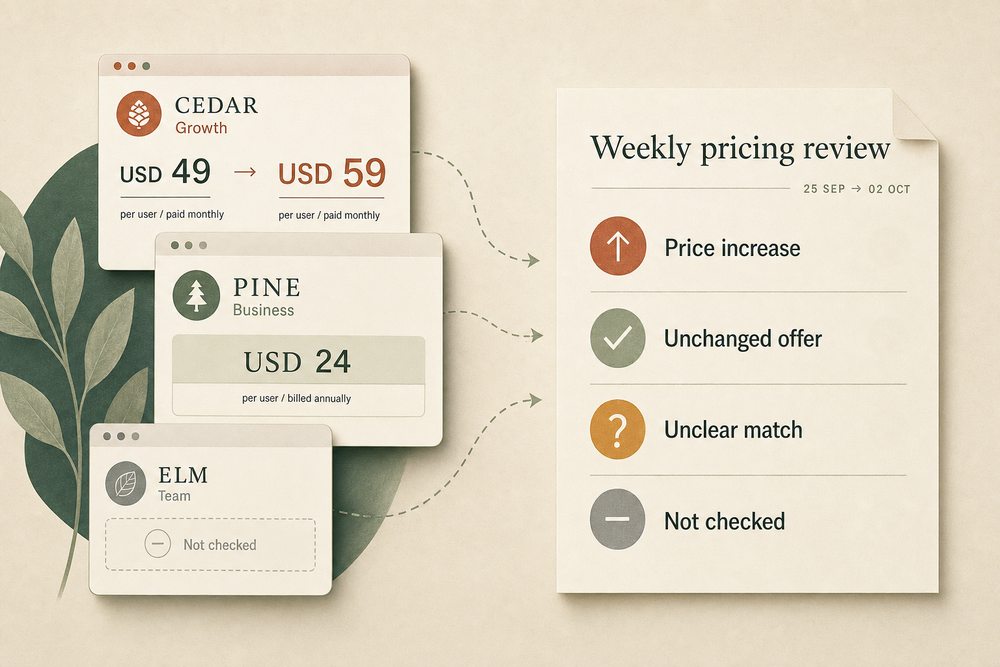
Before Friday’s pricing review, a revenue lead wants to know what three competitors charge today. Cedar’s Growth plan went from USD 49 to USD 59 per user a month. Pine’s Business plan still shows USD 24, but only with annual billing. One of Pine’s other plans is gone, and the card that might replace it is priced in euros. Elm’s page shows a bot check.
Someone has to sort those answers before the numbers reach a sales conversation.
You can hand that to a Midpoint worker. It opens the pages you name, compares each plan with the last check and posts one note for the review. Your pricing owner then decides whether to update sales guidance, look into a changed offer or do nothing.
Here is how to set up the first check, using a made-up software company and three made-up competitors.
Choose the pages and plans
Start with the alternatives that come up in your sales calls. For this example, the revenue lead follows Cedar, Pine and Elm, with four offers across their three pricing pages.
Cedar Growth
- Page to check:
https://cedar.example/pricing - Compare as: USD, per user, paid monthly
Pine Business
- Page to check:
https://pine.example/pricing - Compare as: USD, per user, billed annually
Pine Pro
- Page to check:
https://pine.example/pricing - Compare as: USD, per workspace, paid monthly
Elm Team
- Page to check:
https://elm.example/pricing - Compare as: USD, per workspace, paid monthly
Replace these example addresses and plan names with your own list. Specify the market or region, included usage, minimum seats and any taxes the page states. Keep introductory discounts separate from regular prices. Those details let the worker follow the offer you care about when the page layout changes.
Write the brief as you would for an analyst’s first check:
Open these three public pricing pages and find the four plans in the list above, using the US market. Today is a baseline: record the time, the page address, the billing option you read, the currency, the price and whether it is per user or per workspace. Save an image showing the plan name, price and terms together. Next Friday, check the same four plans and compare. Send me one note with four groups: changed, unchanged, unclear and not checked. Put both check times and links to the saved images on every item. Do not change our own prices, buy anything, contact the competitors or get around a login, bot check or other restriction.
Add the worker to the private Midpoint channel where the revenue team will read the result. It doesn’t need access to your billing system or a competitor account for this public-page check.
Check the billing terms before saving the baseline
Read the first result with the person who owns pricing. Confirm that it follows the right plans and billing options before setting a recurring schedule.
“USD 24 per user per month, billed annually” needs to stay recorded with the annual term. If Pine requires payment for a full year at that rate, the amount is USD 288 per user.
Also check whether the captured amount is a regular price or a temporary offer. Slack’s pricing page, for example, displays promotional and regular prices with billing terms beside them. Saving the relevant card and terms together makes the comparison easier to check later.
Watch included usage too. A plan that falls from ten included seats to five has changed even if its headline price is identical.
Keep the first capture and its timestamp. When an offer changes, save the new capture alongside it. The pricing owner should agree which checked version becomes the next baseline; an unclear plan match stays open until someone resolves it.
Put the results in one digest
Suppose the example list was checked on September 25 at 16:05 UTC and again on October 2 at 16:05 UTC. The revenue lead receives this summary:
Four offers tracked: one price increase, one unchanged offer, one unclear match and one offer not checked. Two of the four could be compared.
Changed: Cedar Growth
- September 25: USD 49 per user/month, paid monthly
- October 2: USD 59 per user/month, paid monthly. Same unit and inclusions
- Next action: Up USD 10 per user/month. Review the sales comparison.
Unchanged: Pine Business
- September 25: USD 24 per user/month, billed annually
- October 2: Same price and annual terms
- Next action: No update needed for this offer.
Unclear: Pine Pro
- September 25: USD 79 per workspace/month, paid monthly
- October 2: Pro name missing. “Team” shows EUR 75 per workspace/month
- Next action: Check the market setting and whether Team replaces Pro. Leave the price comparison open.
Not checked: Elm Team
- September 25: USD 39 per workspace/month, paid monthly
- October 2: Page showed a bot check; current offer unread
- Next action: Check failed October 2 at 16:05 UTC. Last successful check: September 25 at 16:05 UTC.
For each result, ask the worker to include the pricing URL and links to the saved baseline and current captures. A capture should show the plan name, price and billing terms together. If the page redirects, record the final address.
Cedar raised its price sometime in the week between checks; the digest can’t say which day. Pine Business has a comparable current offer; Pine Pro and Elm still need answers.
Review the findings with the pricing owner
Ask three questions about the first note:
- Did it follow the right plans? Cedar Growth is the one your reps compare with your product; confirm that is the card the worker read.
- Are the terms recorded with the price? Check that Pine’s annual billing term appears beside the USD 24 per-user monthly amount in the saved image.
- Which unclear rows need another check? For Pine Pro, the owner can ask for a recheck with the normal region selector, confirm that Team replaced Pro, or leave it open. Putting EUR 75 next to USD 79 would compare two currencies and possibly two products.
Use Cedar’s confirmed increase to review the sales comparison and ask whether it affects a live deal. Its list price doesn’t tell you what its customers actually pay.
Schedule the check after the first result works
Once the pricing owner is satisfied with the baseline and digest, ask the worker to repeat the job:
Every Friday at 9 a.m. America/Los_Angeles, check this same list and post one digest in our private revenue channel in Midpoint. Lead with confirmed changes and unresolved checks. Say how many offers could be compared, including on days when they are unchanged. Keep the captures with the result. Stop checking a page if it presents a login, bot check or other restriction, and report the failed check and last successful check times.
Name the time zone and destination. Ask the worker to confirm that the schedule was saved, then check that the first scheduled digest reaches the team.
Midpoint gives the worker a computer for browser work without an API. A purchasing team can use a similar scheduled note for supplier order-status checks.
Handle the cases that interrupt a comparison
Keep exceptions in the same digest so the revenue team can see the results and the gaps together.
- A different currency appears. Show both currencies and check the agreed market using the page’s normal selector, where available. A converted amount can be labelled separately, but don’t report it as a price change.
- A plan disappears or is renamed. Check its features and limits before accepting a replacement. The card in the same spot isn’t necessarily the same plan.
- Billing terms or limits change. Describe the specific change: annual payment introduced, minimum seats raised, or included usage reduced. A price percentage alone would miss it.
- A page is blocked or fails to load. Mark the offer not checked, with the failed check time and the last successful check time. Stop at a login, bot check or restriction and keep the old baseline.
- The comparable offers are unchanged. List which plans were checked and when.
Decide whether you need a worker or a dedicated monitor
A dedicated monitor is a sensible choice when you know which page area matters and mainly want a filtered change signal. Distill’s documentation describes conditions that filter alerts. It also warns that, when a selection contains several numbers, numeric conditions evaluate those numbers independently. Visualping describes summaries and importance flags in its own alerts.
If a filtered alert is enough, use one of those.
For a large retail catalog, product variants, frequent checks or authorized dynamic repricing, evaluate a purpose-built price platform. Prisync’s Shopify listing, for example, markets variant tracking and dynamic pricing rules.
A worker fits the smaller assignment when matching plans and explaining changed terms are part of the work. Try one check before deciding to make it recurring.
Bring the digest to Friday’s review
At Friday’s review, the revenue lead brings four rows. Cedar’s increase goes to the person who keeps the sales comparison. Pine Business needs no update. Someone is named to settle what happened to Pine Pro, and Elm Team gets another check next week, since the bot check stopped the last one.
To try it, list the two or three competitors your reps mention most, pick the plan each one sells against yours and ask for a baseline first. Turn on the Friday schedule once your pricing owner has read one note and agrees with it.
Talk to Midpoint about giving a worker your competitor pricing list and review schedule.
More articles

AI Agent Incident Communication Plan: Templates, Cadence, and Evidence
A practical AI agent incident communication plan with severity criteria, stakeholder templates, status cadence, evidence, and follow-up.

AI Agent Data Privacy Checklist: Controls That Hold Up in Production
A practical enterprise checklist for classifying agent data, minimizing access, controlling retention and transfers, redacting evidence, reviewing vendors, and proving incident readiness.

AI Agent Observability Tools Compared: A Practical Buyer Guide
Compare eight AI agent observability approaches by traces, tool calls, evaluations, cost, privacy, alerts, deployment, and OpenTelemetry support.